
What should I do if a historical order is not automatically linked?
Is a historical order from the old FiscFree platform not automatically linked to an employee in the new platform? The action required depends on the employee's account and email address.
Good to know:
- Historical orders are automatically linked based on the employee's email address or employee number. Read the article How does FiscFree link historical orders to employees? to learn how this automatic linking works.
-
- Green check mark: the order has been matched. You do not need to do anything.
- Red circle: the order has not yet been matched.Go to Orders > Employee legacy orders. In the Matched column, you can see whether the historical order has already been linked to an employee:
Tip: Click Unmatched to only view historical orders that have not yet been linked.
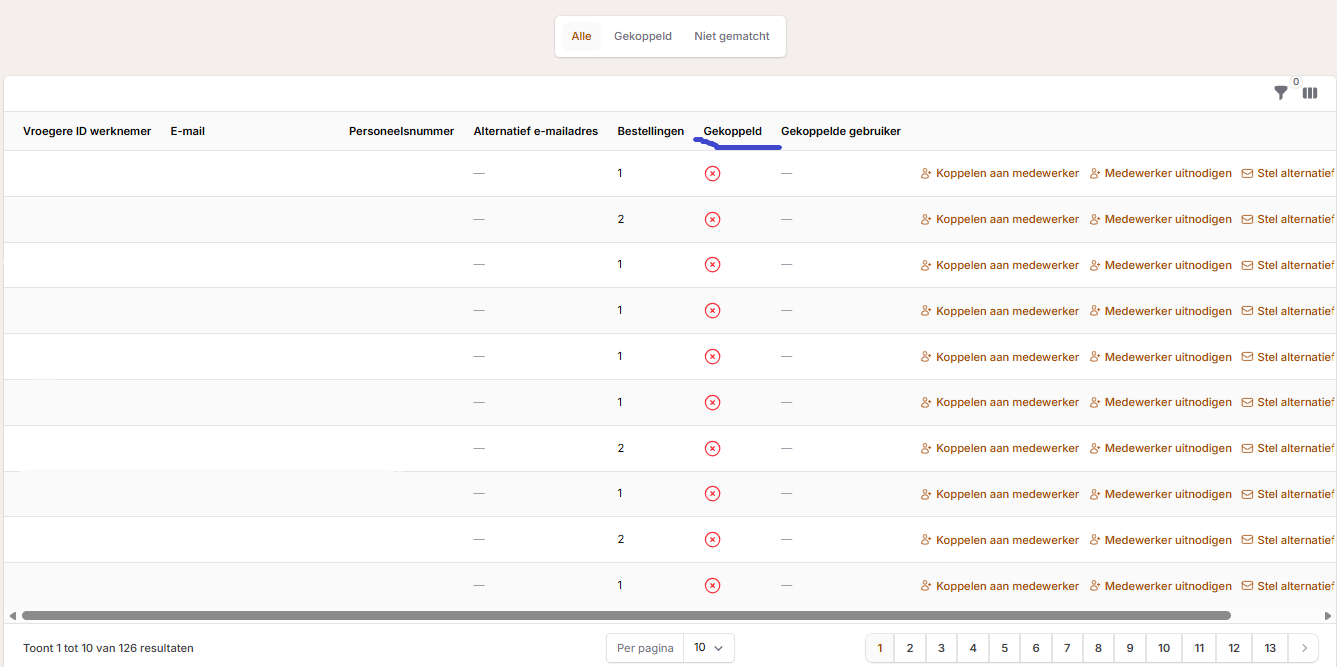
Which action should I choose?
First check whether the employee already has an account in the new FiscFree platform and which email address the employee uses.
You can find the different actions under Orders > Historical orders.
| Situation | Action |
|---|---|
| The employee already has an account in the new platform, but uses a different email address there. | Click Link to employee to link the existing account to the historical order. |
| The employee does not yet have an account in the new platform and will use the same email address as in the old platform. | You do not need to do anything. Once the employee gets an account with the same email address, FiscFree can automatically link the historical order. Do you want to give the employee access immediately? Click Invite employee. |
Note: do not change the email address when creating the invitation.
| Situation | Action |
|---|---|
| The employee does not yet have an account in the new platform and will use a different email address. | Click Set alternative email address so that the system will recognize this email address once the employee logs in to the account. |